Written By Jeremy Farrance
2026-04-08
Important Update Apr 14, 2026
New 10.02.04 Special Upgrade Released
DNN 10.02.04 is special release to help people upgrading from DNN v9, it includes everything in 10.02.03 and a batch of updates and changes that specifically fix any upgrade issues discovered recently. It has also been promoted to the "TO version" on suggested upgrade path after 9.13.09,
v10.02.04 is the correct upgrade target if your DNN is currently 9.13.09 or 9.13.10 and higher, but less than 10.02.00 and you use the old unzip/copy-over method.
If your DNN instance is already on 10.02.00 or higher, then use the new upgrade method and refer to DNN Upgrade Path page.
Reminder: in the main table for the DNN Suggested Ugrade Path the FROM Version means the version listed OR higher up to the TO Version. For example, in the row for 9.13.09 to 10.02.04, if you are on 9.13.10 or maybe 10.1.2 or even 10.02.03, you upgrade to 10.02.04.
Future: the versions suggested here are true at the time of writing thig blog post, always check the official suggested upgrade path page before starting any upgrades in case advice on versions changes in the future.
In the recent DNN Show & Tell Meetup, I did a demo and talk-through of the new upgrade process. If you prefer watching a video, you can check that out here on our YouTube Channel - @DnnShowTell. I have also embedded it below.
Prior to DNN 10.02.00, the upgrade process for DNN was these tried and true steps:
- Get the Upgrade zip package from GitHub
- Unzip everything to a temp folder
- Open the root folder of your DNN instance
- Copy all the unzipped files from temp to your website root
- Watch the progress bar, wait for the popup...
- Answer Yes to replacing files
- Go back to the browser and reload the site, wait...
Those Days Are Behind Us Now
If you are already running DNN 10.02.00 or higher, I very highly recommend you only use the new process from now on.
Why is the new upgrade process is important?
- Fewer steps
- Less technical knowledge needed
- Pre-processing and error prevention
That last one is in bold because its the reason this is so exciting now and will be even more-so in the future. Simply put, by letting "code" handle the unzipping to a temp folder and then having that code further inspect, compare, and possibly fix any known issues - DNN can now completely side-step some common and known types of upgrade issues that would otherwise have thrown ugly, hard to diagnose errors.
This doesn't mean you won't still encounter errors or even "show-stoppers." But knowing hundreds of us will not be hitting a few dozen known errors and gotchas is well worth it!
Where is it?
PersonaBar, Settings, Servers - System Info tab, UPGRADES subtab.
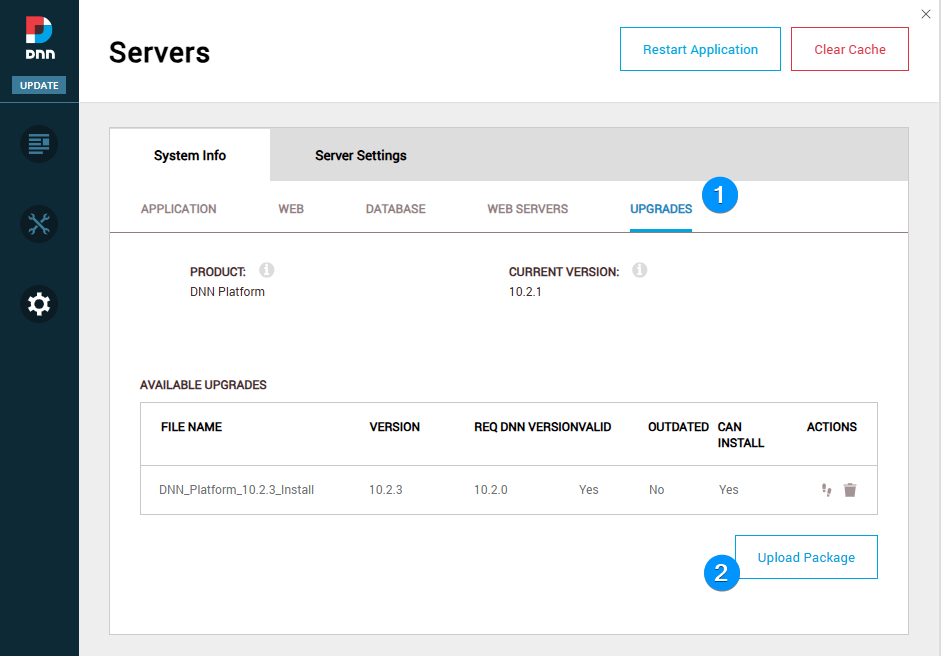
Note that the UI above is still current as of 10.03.x, but will likely change and improve a little over the next few releases.
The first thing to understand is that this is not an automated process. DNN is not going to find and auto-download the right package for you. You still need to go to GitHub/DNN and then Releases.
Where is the Apply or Go button?
Back in the DNN UPGRADES panel, under the ACTIONS column, just to the left of the trash icon is a small "footprints" icon. Click that to kick off the process. Note that the UI is not very responsive yet, so wait a good 5 or 20 seconds if the screen doesn't update right away.
... wait for it ... [ its unzipping the package to a temp folder ]
Now click the nice blue button and after another variable amount of waiting, you will see the familiar DNN upgrade process kick into gear.
What version should you upgrade to?
The correct and obvious answer is the latest or the next TO version in the Upgrade Path table. It is not necessary to go incrementally through each release, all changes are cumulative. For example, if you are on 10.01.02 and there are upgrades for 10.02.00, 10.02.01, 10.02.02, and 10.02.03, 10.02.04, 10.03.00, 10.03.01 you should go directly to 10.02.04, consider making another backup since you have hit a TO version in the Upgrade Path table, then upgrade either to next stopping point (or latest release).
There are occasional exceptions and if your DNN site is very out of date, you should consult the official upgrade path info in the DNN Docs. This is very easy to find,
Google this: "dnn upgrade path"
and its usually the first result, so remember those 3 words. Since you're here, you can click this link to see the official DNN Suggested Upgrade Path in the DNNDocs site.
Note that from now on, you want the Install Package. The Upgrade packages will probably no longer be needed or created (by the end of 2026 or maybe 10.05?).
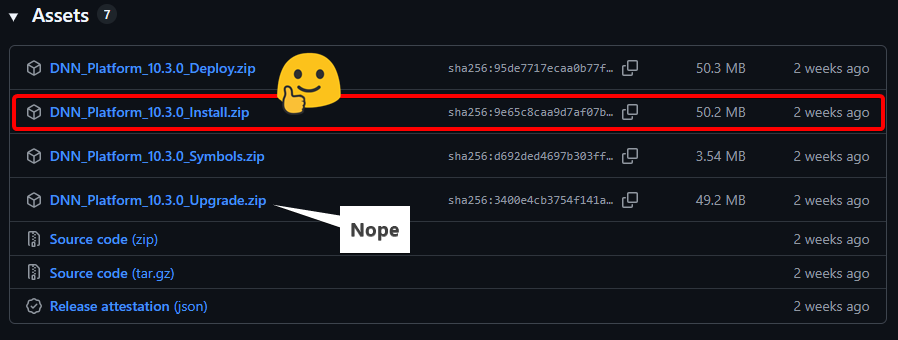
And that is it. Hopefully you are now back in familiar territory and have your host password handy.