Written By Sacha
2026-03-27
WebForms vs MVC 5 in .NET Framework: Understanding the HTML Differences
For information about the background of the MVC-pipeline, please read these blog posts.
Intro: https://dnncommunity.org/blogs/Post/20392/A-True-MVC-Pipeline-for-DNN
Testable preview: https://dnncommunity.org/blogs/Post/22468/MVC-Pipeline-Technology-Preview-Installer
The Form Tag
WebForms: The Single Form Paradigm
WebForms enforces a single <form runat="server"> in default.aspx that wraps the entire page content. This server-side form is fundamental to the WebForms postback model.
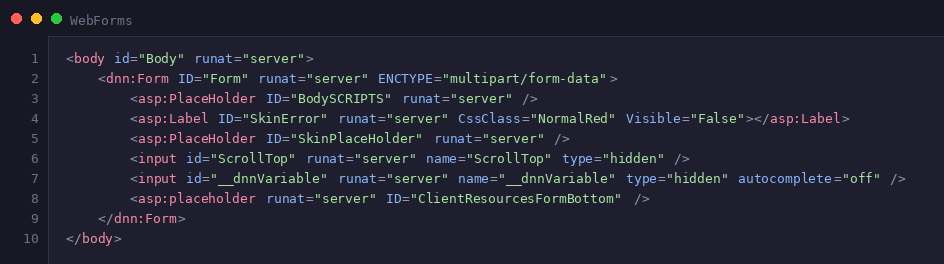
When rendered, this generates:
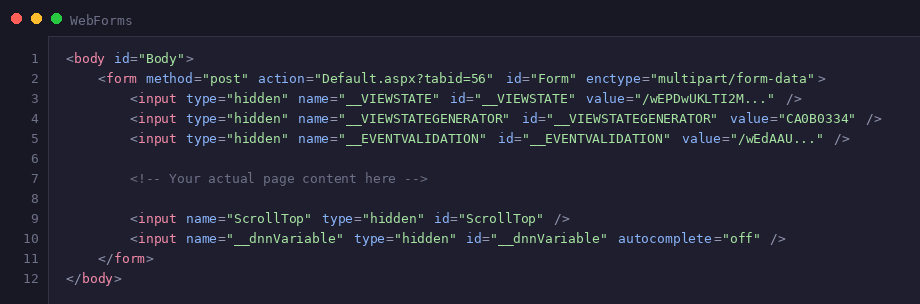
Key characteristics:
- Only ONE form allowed per page
- Always posts back to the same page
- Automatically includes ViewState and validation fields
MVC: Multiple Forms, Your Choice
MVC uses standard HTML forms. You can have multiple forms on a page, each posting to their own controller actions.
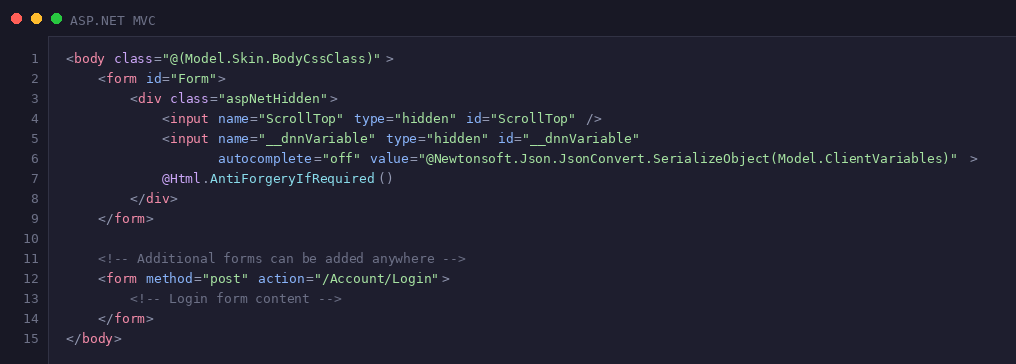
Key characteristics:
- Multiple forms possible
- Explicit action URLs pointing to controller actions
- No ViewState
- Clean, predictable HTML
Input Controls
WebForms: Server Controls with Auto-Generated IDs
WebForms uses server controls that generate complex HTML with auto-generated IDs based on the control hierarchy.

This generates HTML like:

Problems with this approach:
- IDs are unpredictable and change based on control placement
- JavaScript and CSS targeting becomes difficult
- ClientIDMode can help but adds complexity
- Names include control hierarchy (ctl00$ContentPane$...)
MVC: Clean HTML You Control
MVC generates clean, predictable HTML. You have full control over element IDs and names.
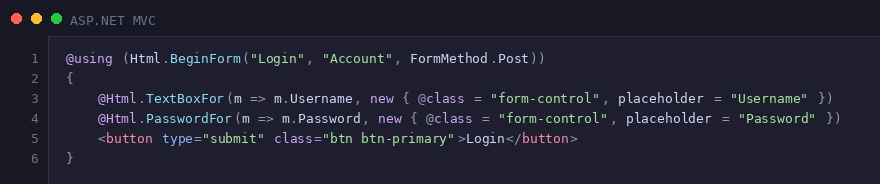
Generates:

Advantages:
- Predictable IDs matching your model properties
- Easy to target with JavaScript and CSS
- Clean HTML that follows modern web standards
- Full control over attributes and rendering
Buttons and PostBack
WebForms: The PostBack Mechanism
WebForms buttons trigger a postback to the server, reloading the entire page and firing server-side events.

Generates:

The framework injects the __doPostBack function:
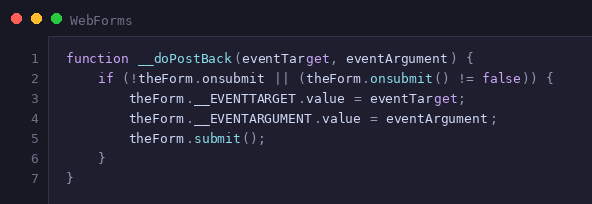
How it works:
- Button click triggers JavaScript function
- Hidden fields __EVENTTARGET and __EVENTARGUMENT are populated
- Form submits to the same page
- Server reads these fields to determine which control caused the postback
- Server-side event handler executes
- Entire page re-renders
MVC: Standard HTTP POST
MVC uses standard HTML form submission. Buttons simply submit forms to controller actions.

Generates:

How it works:
- Button click submits the form
- HTTP POST to the specified action URL
- Controller action processes the request
- Returns a view, redirects, or returns JSON
- No page lifecycle or postback mechanism
ViewState: The Elephant in the Room
WebForms: Automatic State Management
ViewState is WebForms' mechanism for maintaining control state across postbacks. It's a hidden field containing base64-encoded serialized data.

This small example is already 206 bytes. In real applications, ViewState can easily grow to:
- 5-50 KB for typical pages
- 100+ KB for complex pages with grids and many controls
- 1+ MB in extreme cases with poor design
What's stored in ViewState?
- Control property values
- Control hierarchy and state
- Data for controls like GridView, Repeater
- Custom data added by developers
Problems:
- Increases page size significantly
- Sent with every request (upload) and response (download)
- Performance impact on mobile/slow connections
- Can be disabled but breaks many controls
MVC: No ViewState, Stateless Design
MVC is stateless by design. There's no ViewState field.
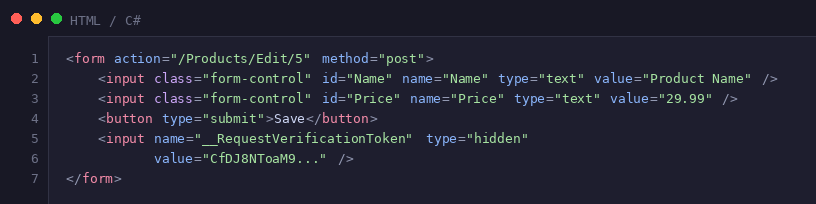
Instead of ViewState:
- Model binding reconstructs objects from form data
- Anti-forgery token for CSRF protection (~80 bytes)
- TempData or Session for cross-request data
- Client-side state management (localStorage, cookies)
Benefits:
- Dramatically smaller page size
- Faster page loads
- Better performance on mobile devices
- More control over what data travels over the wire
Injected JavaScript
WebForms: Automatic Script Injection
WebForms automatically injects numerous scripts for its infrastructure:
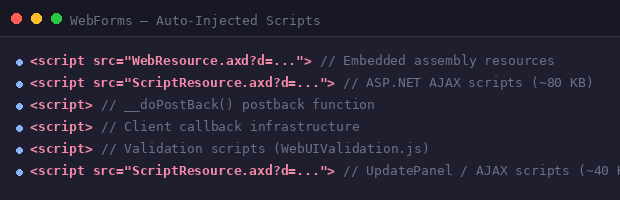
What gets injected:
- WebResource.axd - Embedded resources from assemblies
- ScriptResource.axd - ASP.NET AJAX scripts
- __doPostBack() - Postback function
- Client callback infrastructure
- Validation scripts
- Update panel scripts (if using AJAX)
Total overhead: Often 100-200 KB of JavaScript you didn't explicitly request.
MVC: Explicit Script Control
In MVC, you control every script reference:
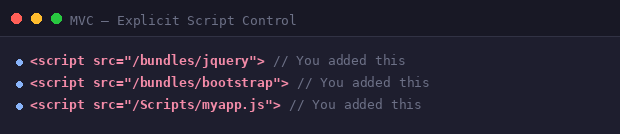
Benefits:
- Full control over what scripts load
- Easy optimization and bundling
- No surprise script injections
- Better for Content Security Policy (CSP)
- Cleaner debugging experience
Web Page Parts: Reusable Components
Both frameworks provide mechanisms for creating reusable page components, but they do so in very different ways.
WebForms: User Controls (.ascx)
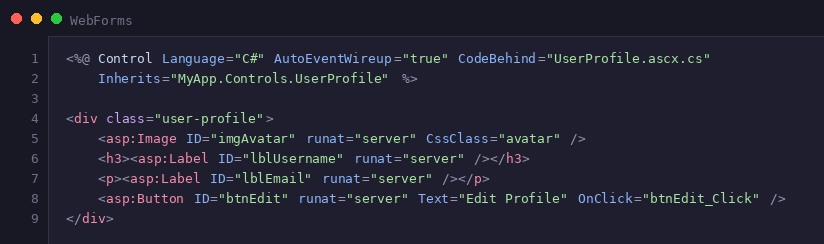
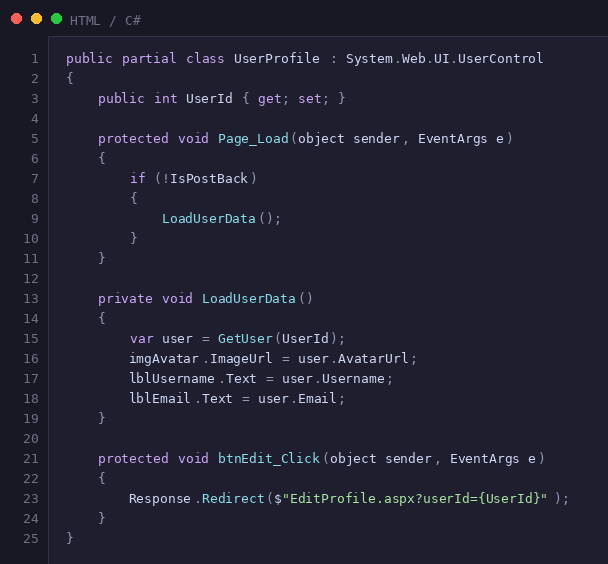
WebForms uses User Controls for reusable components. These are .ascx files that work like mini-pages with their own code-behind.
UserProfile.ascx:
UserProfile.ascx.cs:
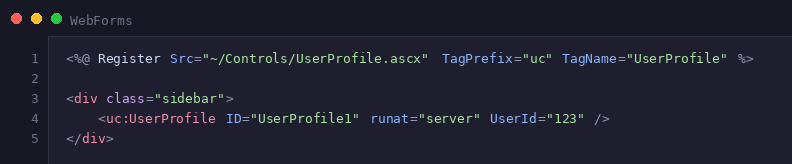
Usage in parent page:
Generated HTML:

Characteristics:
- Stateful with ViewState
- IDs prefixed with control instance name (UserProfile1_)
- Full page lifecycle (Init, Load, PreRender, etc.)
- Can handle postback events
- Tightly coupled to parent page
- Difficult to test in isolation
MVC: Partial Views
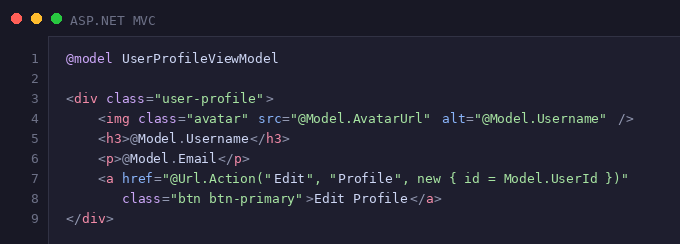
MVC uses Partial Views - simple .cshtml files, perfect for reusable UI fragments.
_UserProfile.cshtml:
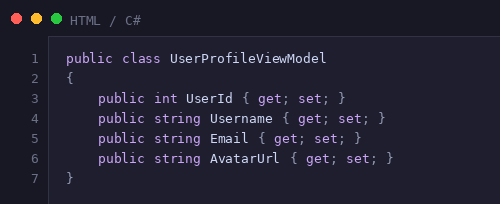
UserProfileViewModel.cs:
Usage in parent view:
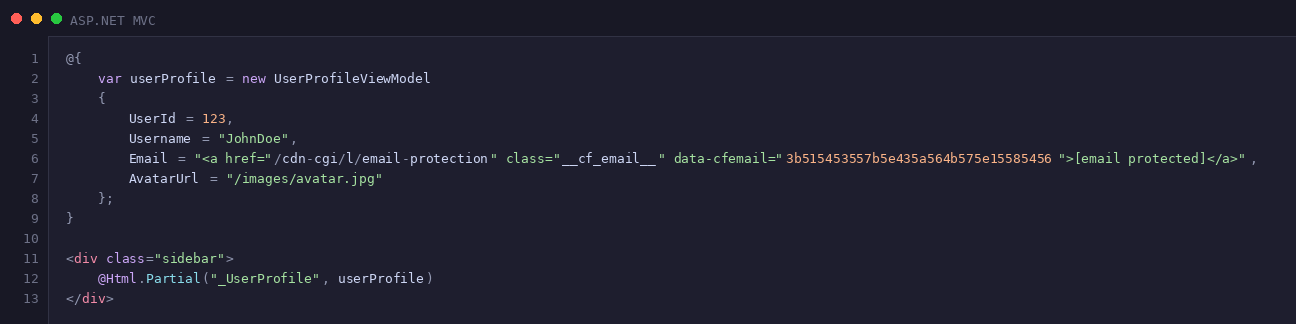
Generated HTML:

Characteristics:
- Stateless, no ViewState
- Clean IDs without prefixes
- Just a view template, no lifecycle
- Cannot handle postback (uses links/forms instead)
- Loosely coupled
- Easy to test
MVC: Child Actions (for Complex Components)
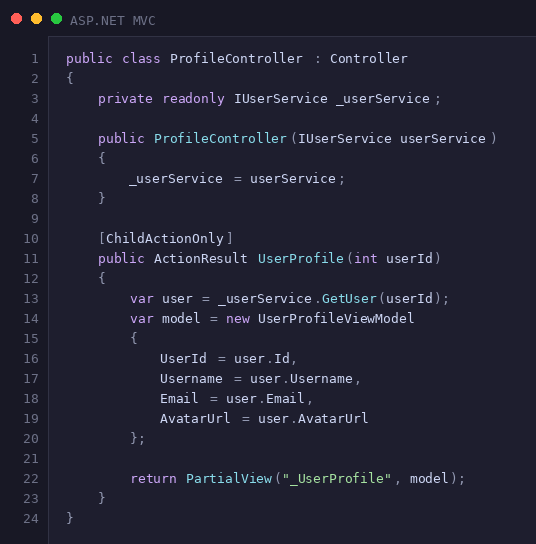
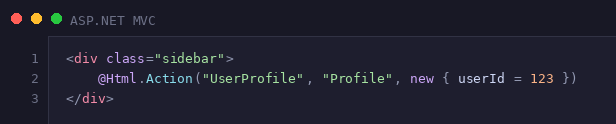
When a partial needs its own data loading logic, MVC uses Child Actions - controller actions called from views.
ProfileController.cs:
Usage in parent view:
Characteristics:
- Encapsulates both data loading and rendering
- Controller handles the logic, view handles presentation
- Can be tested independently
- Reusable across different pages
- Better separation of concerns than WebForms controls
Key Takeaways
Control Over HTML
- WebForms: Limited control. The framework generates IDs, names, and structure.
- MVC: Complete control. You write the HTML you want.
Performance
- WebForms: Large payload due to ViewState and injected scripts. Typical page overhead: 50-200 KB.
- MVC: Minimal payload. Only what you explicitly include. Typical overhead: 5-20 KB.
Testing
- WebForms: Testing requires simulating the page lifecycle. Integration tests are more common than unit tests.
- MVC: Controllers are plain classes that are easy to unit test. Views can be tested separately.
Separation of Concerns
- WebForms: Code-behind mixes presentation and logic. Controls handle both rendering and behavior.
- MVC: Clear separation: Models (data), Views (presentation), Controllers (logic).
Learning Curve
- WebForms: Easier for beginners, especially those from desktop development. Drag-and-drop RAD experience.
- MVC: Steeper learning curve. Requires understanding HTTP, routing, and web fundamentals.
State Management
- WebForms: Automatic via ViewState. Makes some scenarios easier but with performance cost.
- MVC: Manual and explicit. More work but better performance and control.
Conclusion
Both ASP.NET WebForms and ASP.NET MVC 5 are mature, production-ready frameworks, but they represent different philosophies in web development.
WebForms was designed to make web development feel like desktop development, hiding HTTP complexities and providing a RAD experience. This abstraction comes at a cost: large page sizes, limited HTML control, and a tight coupling between UI and logic.
MVC embraces the stateless nature of the web, giving developers full control over HTML while enforcing separation of concerns. The result is cleaner code, better performance, and easier testing—at the cost of a steeper learning curve.
DNN MVC Pipeline Project
Project Overview
The DNN MVC Pipeline project introduces a new rendering mechanism based on ASP.NET MVC 5, running alongside the traditional WebForms pipeline. Pages are accessed via mvc controller DefaultController instead of Default.aspx.
DNN Modules: Different Implementations per Pipeline
In DNN Platform, modules are the building blocks of content on pages. The way modules are implemented differs fundamentally between the two pipelines:
WebForms Pipeline:
- Modules are implemented as User Controls (.ascx files)
- Each module has a code-behind file with server-side logic
- Modules participate in the full page lifecycle
- ViewState tracks module state across postbacks
MVC Pipeline:
- Modules are implemented as Partial Views (.cshtml files) or Child Actions
- Logic is in controllers, not code-behind
- Modules are rendered as part of the view composition
- Stateless by design
How DNN Renders Modules in Each Pipeline
WebForms Pipeline Process:
- Page lifecycle begins (Default.aspx)
- Skin control (.ascx) is loaded
- For each module in each pane:
- Load module control (.ascx) dynamically
- Add to control tree
- Module's Page_Load executes
- Module renders to HTML
- ViewState serialized for all controls
- Complete page HTML sent to browser
MVC Pipeline Process:
- Request hits MVC route (DefaultController)
- Controller creates PageModel with all modules
- Main layout view renders
- Skin view renders panes
- For each module in each pane:
- Load mvc module control class
- The module control call a Razor Partial or Child Action Controller to generate the html
- Complete page HTML sent to browser (no ViewState)
Dual-Pipeline Module Example
A module can support both pipelines by providing both implementations:
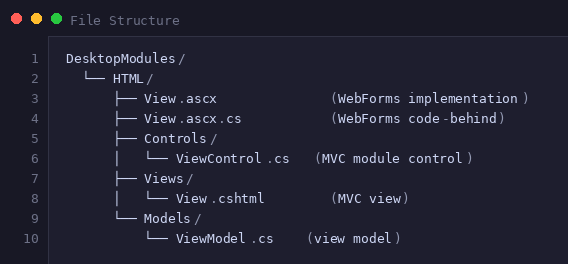
Edit Module Controls
Edit Module Controls are always rendered alone on a page in DNN (url with ctl=edit&mid=123). So they don't need to support the 2 pipeline. The module developer can chose to implement one or the other.
Best practices for dual-pipeline modules:
- Share business logic in separate service classes
- Keep views thin (presentation only)
- Use view models for both implementations
- Module html can contains forms with call Mvc Controllers by AJAX
Alternative: Shared Razor Views for Both Pipelines
For modules that don't require postback functionality, you can create a single Razor view that works in both pipelines:
Key Requirement: Since there's no postback mechanism in MVC and no code-behind to handle events, all user interactions must be managed client-side using JavaScript with webapi controllers, similar to a Single Page Application (SPA) approach.
Benefits of Shared Razor + SPA Approach:
This SPA-style approach represents the modern direction for web development and works beautifully in DNN's dual-pipeline architecture, providing a consistent, high-performance user experience regardless of which pipeline renders the page.
Cons Forms can not be used because webforms contain already a global form.
This blog post was created to help developers understand the practical differences between WebForms and MVC 5, focusing on the generated HTML output.